
Many businesses still depend on a combination of ERP software, spreadsheets, emails and separate applications to manage their daily work. Sales teams handle customer orders, purchasing teams manage suppliers, and management teams collect reports from different sources.
When these activities are not properly connected, getting the right information and coordinating work between teams can become difficult.
ERP digitalization helps businesses manage these activities through digital business applications. It brings related processes, transaction information, approvals and reports into a more organized working environment.
For businesses planning to improve their operations, understanding how ERP digitalization works is an important first step.
What Is ERP Digitalization?
ERP digitalization means using ERP software and business applications to manage company activities through digital systems instead of depending mainly on manual records and disconnected processes.
An ERP platform can bring different business functions into one working environment. Depending on the software and its capabilities, this may include sales, purchasing, inventory, production, quality management, approvals and reporting.
For example, when a business receives a customer order, the related information may need to be reviewed by sales, planning, purchasing and production teams. A connected business application can help manage these activities through defined processes.
ERP digitalization can help businesses:
- Manage business transactions through digital applications.
- Route transactions for approval.
- Apply business rules and data validation.
- Maintain documents alongside related transactions.
- Connect existing business systems.
- Review operational information through dashboards and reports.
- Maintain audit records and traceability information.
The aim is to make everyday business activities easier to manage and review.
Why Do Businesses Need ERP Digitalization?
As a business grows, its processes often become more demanding. More transactions, employees, departments and approval requirements can make manual coordination difficult.
Here are some common situations where ERP digitalization can help.
1. Business Information Is Spread Across Different Systems
When teams maintain their information in separate applications or spreadsheets, finding the latest details can take time.
A connected ERP platform can bring supported business activities into a common application environment.
2. Approvals Take Too Much Manual Follow-up
Some transactions require approval from managers or authorized employees. When these requests are handled through emails and manual follow-ups, checking their current status and approval history can become difficult.
Approval workflows help route transactions according to defined business rules and authorization levels.
3. Managers Need Better Operational Reports
Management teams often need information about sales, purchasing, production, inventory and other business activities.
When this information is maintained separately, preparing reports may require additional effort.
Dashboards, KPIs and reports can present relevant business information in a more organized format.
4. Important Documents Are Difficult to Locate
Quotations, purchase documents, inspection records and delivery documents are part of everyday business operations.
When supporting documents are stored separately, employees may need extra time to find the information related to a transaction.
Integrated attachments and document management help associate supporting files with the relevant business records.
5. Existing ERP Software Does Not Cover Every Requirement
A business may already use an ERP system but still need additional applications, planning capabilities, workflows or reporting.
In this situation, an ERP extension can provide additional business capabilities while working with the existing system, subject to the integration requirements.
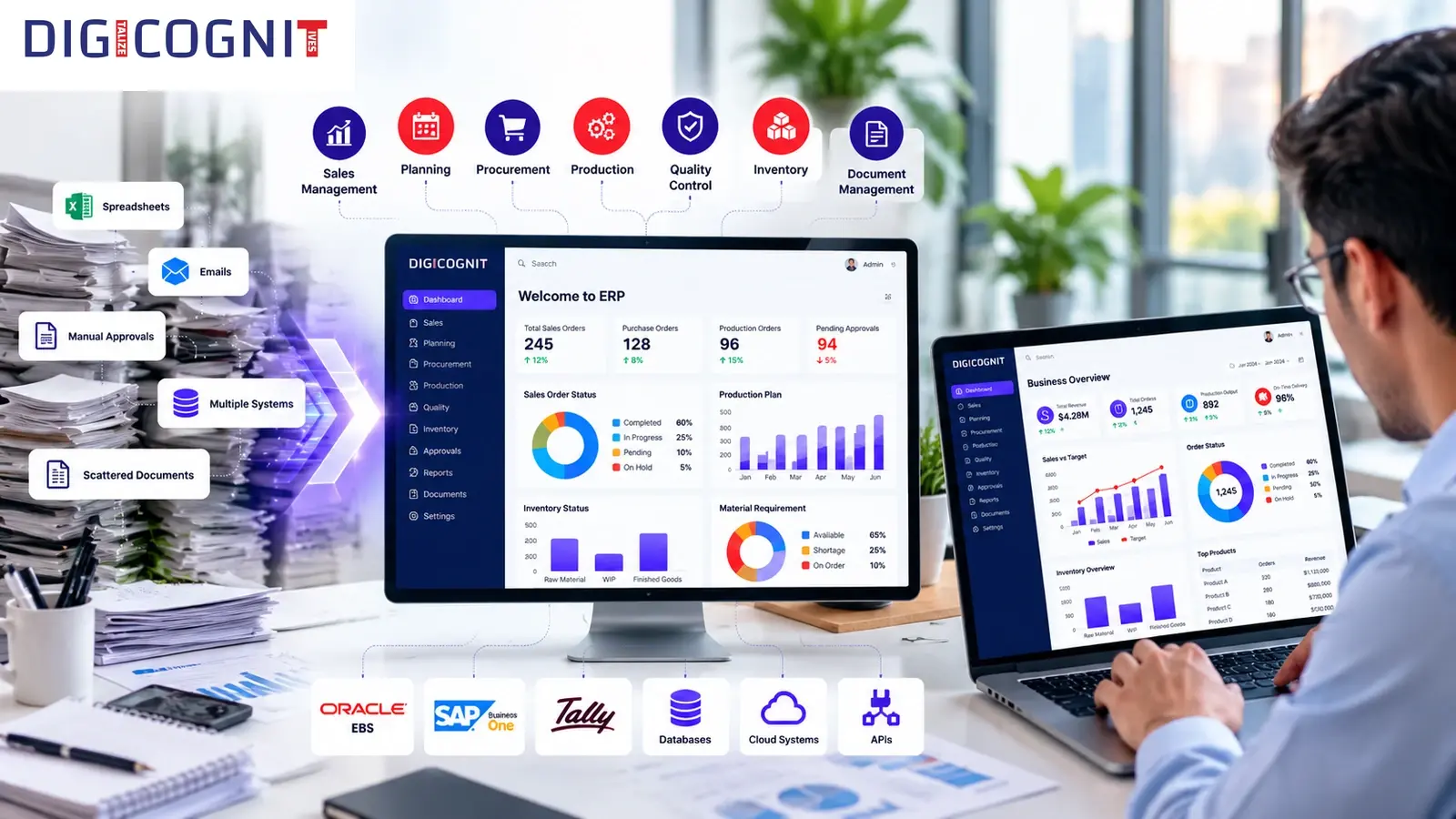
Important Features of ERP Digitalization
The features required for ERP digitalization depend on how a business operates. However, several capabilities are commonly relevant when managing business activities through an enterprise platform.
1. Digital Business Applications
Business applications help employees manage their responsibilities through defined screens, transactions and processes.
Depending on the platform, these applications may cover:
- Sales Management
- Planning
- Procurement Management
- Production Management
- Quality Control
- Inventory Management
- Batch Traceability
Having related applications within the same platform can make it easier for teams to work with connected business information.
2. Approval Workflow Management
Not every business transaction should move forward without authorization. Purchase requests, sales orders and other activities may require approval based on company rules.
Configurable approval workflows can route transactions according to conditions such as:
- Transaction value
- Department
- Customer
- Product
- Supplier
- Business unit
- Authorization level
The platform can maintain approval history, track status and support rejection and resubmission.
This helps businesses manage approvals through a defined process rather than relying entirely on manual follow-ups.
3. Business Rules and Data Validation
Business applications need to follow the rules defined by the organization.
Business rules and data validation help apply these conditions during business transactions.
Roles and permissions also help control which users can access particular applications and information.
These capabilities are useful when businesses need consistent process controls across their applications.
4. Document Management and Attachments
Many transactions require supporting documents.
For example, a purchase order may need related documents, while a quality inspection may require supporting records.
Integrated attachments allow files to be associated with relevant transactions. Document management helps organize these records, while PDF and Excel document generation supports standardized business outputs.
5. Dashboards and Business Reports
Business reports help teams understand what is happening across their operations.
Depending on the configured requirements, dashboards and reports can cover:
- Sales performance
- Pending sales orders
- Procurement status
- Production progress
- Available inventory
- Material shortages
- Cost analysis
- Quality information
- Traceability information
Dashboards can present KPIs, charts and summary tables. Reports can provide transaction-level, operational and management information.
This helps users review business activity without relying only on manually prepared summaries.
6. ERP and System Integration
Businesses may already use ERP software, databases and other applications to manage different activities.
ERP integration helps connect these systems where the required integration is supported.
A platform may integrate with existing ERP systems, databases, APIs, local servers, cloud systems and external applications.
For example, organizations using Oracle EBS may consider an ERP extension approach when they need additional business applications or operational capabilities. The actual integration depends on the required scope and implementation.
Does ERP Digitalization Mean Replacing Your Existing ERP?
Not necessarily. Businesses can digitalize their operations without making ERP replacement the only option.
The right approach depends on the systems already in use and the capabilities the organization needs.
There are two deployment approaches to consider.
Standalone ERP or Business Application
Some organizations need a business platform to manage their operational activities.
A standalone ERP or business application can provide supported modules such as sales, planning, procurement, production, quality and inventory, along with workflows, reporting and other platform services.
ERP Extension or Integrated Platform
Other organizations already have an ERP system but need additional functionality.
They may require specialized planning, approval workflows, dashboards, reporting, quality management or traceability capabilities.
An ERP extension approach allows an additional platform to work alongside the existing ERP, with integration based on the business and technical requirements.
For example, the platform can integrate with Oracle EBS and other supported systems.
The decision between a standalone platform and an ERP extension should be based on the organization's existing systems and actual business needs.
Four Main Layers of an ERP Digitalization Platform
A business platform does more than provide individual applications. It also needs services for managing users, processes, information and system connections.
These capabilities can be understood through four main layers.
Business Application Layer
This layer contains the applications employees use to manage business activities.
Examples include Sales Management, Planning, Procurement Management, Production Management, Quality Control, Inventory Management and Batch Traceability.
Platform Services Layer
This layer provides common services used across business applications.
These include approval workflows, business rules, roles and permissions, integrated attachments, audit trails, notifications, document management and data validation.
Visibility and Intelligence Layer
This layer helps users review business information through dashboards, KPIs and reports.
It can include sales analysis, inventory analysis, material requirement analysis, cost analysis and traceability reports.
Integration Layer
This layer connects the platform with existing ERP systems, databases, APIs, local servers, cloud systems and external applications.
Together, these layers help businesses manage applications, process controls, reporting and integrations within the same platform.
What Should You Check Before Choosing an ERP Digitalization Solution?
Choosing an ERP platform requires more than comparing a list of software features. Businesses should first understand what they need to manage and how their current systems work.
Consider these points before making a decision.
Review Your Current Processes
Understand how employees currently manage transactions, approvals, documents and reports.
Identify the Main Problems
Find out where manual work, disconnected systems, repeated data entry or delayed approvals create difficulties.
List the Required Applications
Decide which business functions need digital applications. These may include sales, purchasing, planning, production, quality or inventory.
Check Your Existing ERP System
Determine whether you need a standalone platform or additional capabilities alongside your existing ERP.
Understand Integration Requirements
Identify the systems, databases and APIs that need to exchange information with the proposed platform.
Review Reporting Needs
Decide which dashboards, KPIs and reports are useful for employees, department heads and management.
A clear list of requirements makes it easier to assess whether a platform is suitable for the business.
How DIGICOGNIT Supports ERP Digitalization
DIGICOGNIT provides a configurable enterprise business application, ERP, planning, workflow and process automation platform.
It is designed to connect business applications, process controls, operational information and system integrations.
The platform supports two deployment approaches.
Standalone ERP / Business Application: For organizations that need an operational business platform.
ERP Extension / Integrated Platform: For organizations that need additional business capabilities alongside an existing ERP system.
Its capabilities include:
- Sales Management and Sales Order Management
- Advanced Planning and RM Commit Workbench
- Procurement Management
- Production Management
- Quality Control
- Inventory Management
- Batch Traceability and QC Traceability
- Approval Workflow and Business Rules
- Roles and Permissions
- Integrated Attachments and Document Management
- Dashboards, KPIs and Business Reporting
- PDF and Excel Document Generation
- ERP and System Integration
RM Commit Workbench
The RM Commit Workbench helps planners review pending sales orders, BOM requirements, available raw materials, existing commitments, production requirements and procurement requirements.
It helps answer an important planning question: which orders can be fulfilled based on the available materials and related requirements?
Batch Traceability and QC Traceability
DIGICOGNIT provides separate capabilities for Batch Traceability and QC Traceability.
Batch Traceability tracks material and batch genealogy, including where materials came from, how they were used and where the resulting products went.
QC Traceability focuses on quality inspections, results, decisions and quality issues across related materials, batches and business activities.
Both capabilities serve different purposes and should not be treated as the same function.
These features allow businesses to manage supported operational processes, review business information and connect their existing systems through a configurable platform.
Conclusion
ERP digitalization is not just about moving business records into software. It is about improving how employees manage transactions, approvals, documents, reports and information across the organization.
A suitable ERP platform can bring related business applications together, provide structured workflows and connect with existing systems where required.
Whether a business needs a standalone ERP or additional capabilities alongside its current system, the decision should begin with its actual operational requirements.
DIGICOGNIT provides business applications, planning, workflows, reporting, traceability and integration capabilities to support these requirements.
Looking to improve how your business manages its operations? Explore DIGICOGNIT's enterprise platform and discuss your ERP digitalization requirements with our team.
Frequently Asked Questions
1. What is ERP digitalization?
ERP digitalization is the use of ERP software and connected business applications to manage business activities, transactions, workflows and operational information through digital systems.
2. Why is ERP digitalization important?
It helps businesses manage related activities through digital applications, organize approval processes, maintain transaction records and review operational information through reports and dashboards.
3. Does ERP digitalization require replacing an existing ERP?
No. Businesses can use a standalone ERP platform or extend their existing ERP environment with additional applications and capabilities, depending on their requirements.
4. What features should an ERP digitalization platform have?
Relevant capabilities may include business applications, approval workflows, business rules, roles and permissions, document management, dashboards, reporting, audit trails and system integration.
5. Can an ERP platform integrate with Oracle EBS?
A platform that supports Oracle EBS integration can work alongside the existing ERP environment. The actual integration depends on the required business processes and implementation scope.
6. How do dashboards help businesses?
Dashboards present business information through KPI cards, charts, graphs and summary tables. They help users review operational and management information.
7. What is the difference between ERP digitalization and ERP digital transformation?
ERP digitalization focuses on using digital systems to manage and connect business processes. ERP digital transformation is a broader business initiative that may involve changes to systems, processes and the way an organization operates.
