
Introduction
In manufacturing, one customer order can involve several teams. Sales receives the order, planning checks the materials, purchasing contacts suppliers, production prepares the work, and Quality Control checks the materials and finished products.
Each team has its own responsibilities, but the work is connected. If one team does not have the right information, the next step can be delayed.
For example, sales may confirm an order without knowing that a required raw material is out of stock. Production may then have to wait while the purchasing team arranges the missing material.
This is a common challenge for manufacturing businesses, especially when information is spread across spreadsheets, emails, and separate systems.
A manufacturing ERP system helps bring these activities together. It connects sales, planning, purchasing, production, quality, and inventory so teams can see what is required and understand what needs to happen next.
Why Manufacturing Teams Need Connected Information
Consider a customer who orders 1,000 units of a product. The business currently has only 400 units in finished-goods stock.
Can the remaining 600 units be produced and delivered on time?
To answer this, the planning team needs to check several things:
What raw materials and components are required?
How much material is available in stock?
Are any materials waiting for quality approval?
Which materials need to be purchased?
How much additional production is required?
Can the materials arrive before production needs them?
Can the finished products be ready by the promised delivery date?
When this information is held in different places, employees may need to contact several departments before making a decision.
A connected manufacturing ERP system gives teams a clearer view of these requirements. Instead of checking each department separately, they can work with related business information and understand how one activity affects another.
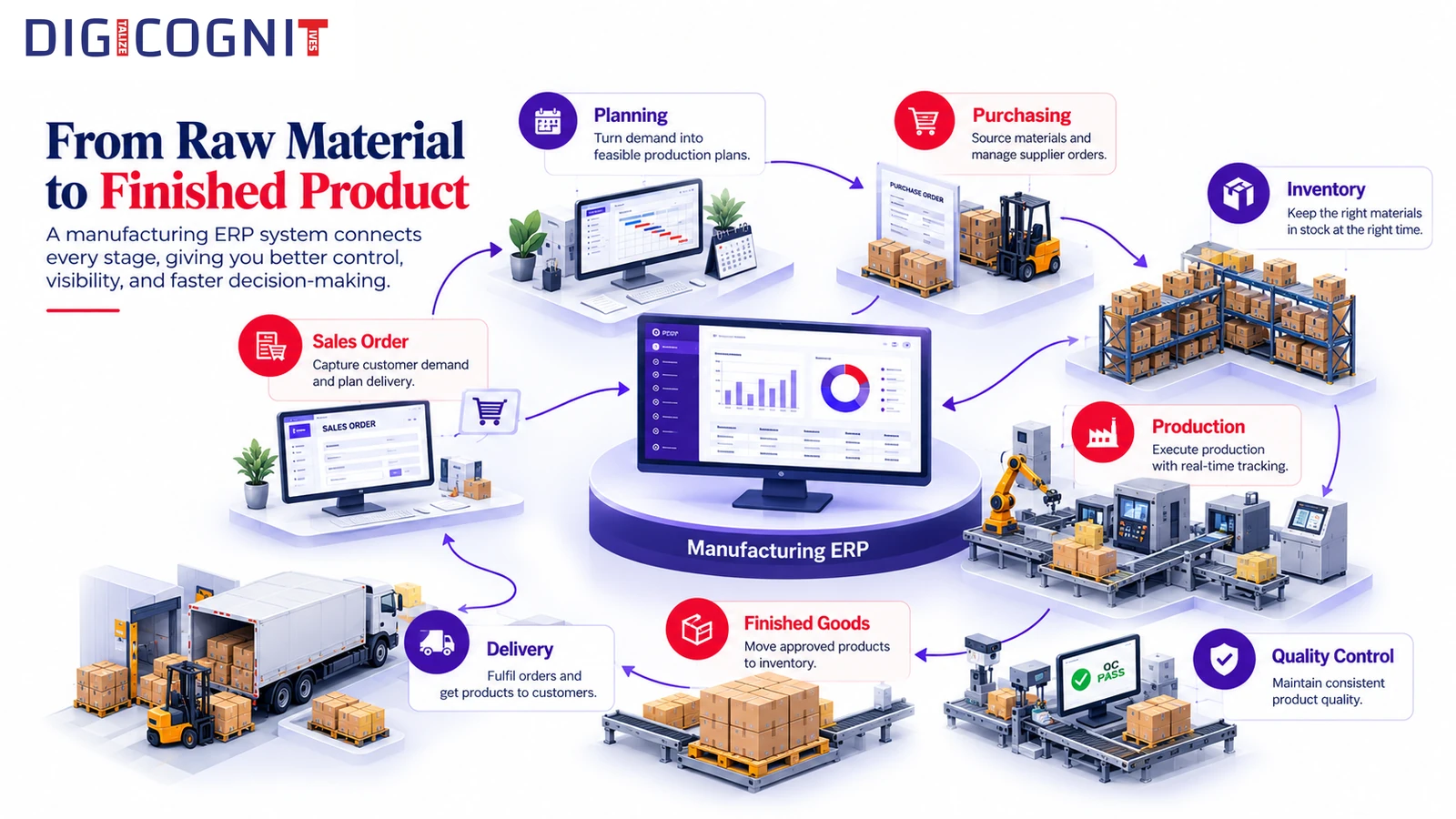
How a Manufacturing ERP System Connects the Workflow
A typical manufacturing process follows this path:
Sales Order → Approval → Planning → Purchasing and Production → Quality Control → Inventory → Delivery
Each stage depends on information from the others.
When a sales order is approved, the planning team can review the required materials and quantities. If there is a shortage, the business can identify what needs to be purchased and what needs to be produced.
The purchasing team can follow up on the required materials, while production can plan its work based on material availability. Quality checks help determine whether materials and finished products are ready for use or delivery.
This connection helps teams understand order requirements before making decisions about production and delivery.
A Simple Example
Imagine a customer places an order for 1,000 units, but only 400 finished units are available.
The remaining 600 units need to be produced.
Before confirming the delivery plan, the team needs to know whether the required raw materials are available, whether additional materials must be purchased, and how much production time is needed.
A connected ERP workflow helps the planning team review these requirements together.
The important question is not just how much stock is available. It is whether the business has the materials, time, and production capacity needed to complete the order.
Understanding Material Requirements Before Confirming an Order
Checking finished-product stock alone does not always give the full picture.
A finished product may contain several components listed in its Bill of Materials (BOM). Some components may be available, while others may be in short supply or waiting for quality approval.
The planning team needs to understand these requirements before deciding how an order can be fulfilled.
This is where an RM Commit Workbench can help.
It brings together information about:
Sales orders and pending demand
Bill of Materials (BOM) requirements
Raw materials and available stock
Material shortages
Production requirements
Purchasing requirements
Instead of checking every order separately, planners can review material availability and identify what needs to be purchased or produced.
This helps answer a practical question: What do we need to complete this order, and are the required materials available at the right time?
Connecting Purchasing with Production
Purchasing and production depend on each other.
If a required raw material is unavailable, production may have to wait. If the material arrives late, the delivery schedule may also be affected.
A typical purchasing workflow looks like this:
Material Requirement → Purchase Requisition → Approval → Purchase Order → Material Receipt → Quality Check → Inventory
The process may include supplier details, quotations, purchase requisitions, purchase orders, and material receipts.
When purchasing is connected to production planning, the team can understand why a material is needed and how it relates to a production requirement.
For example, if a component is required to complete a customer order, the purchasing team can track the relevant purchase order while planners monitor the material shortage.
Once the material arrives, the required quality checks can take place before it is released for production.
This helps purchasing decisions stay connected to actual business needs.
Production Planning Is More Than Creating a Production Order
Creating a production order is only one part of the manufacturing process.
Production teams also need to know whether the required materials are available, what needs to be issued, how much material will be consumed, and which quality checks must be completed.
They may need visibility into:
Required raw materials and components
Material shortages and availability
Material issues and consumption
Production status
Intermediate materials
Finished-product batches
Quality requirements
A connected manufacturing ERP system links production orders with material requirements and the wider manufacturing workflow.
This helps production teams understand the work that needs to be completed and identify material-related issues that could affect the schedule.
It also helps connect the production plan with the delivery commitments made to customers.
Why Quality Control Needs to Be Part of the Workflow
Quality Control (QC) affects more than the final inspection of a product.
Incoming raw materials may need to be inspected before use. Production may require checks at different stages, and finished products may need final approval before they can be released.
A typical quality workflow follows this sequence:
QC Request → Inspection → Test Results → Quality Decision → Release, Reject, or Hold
When quality information is connected to material and production records, other teams can understand which materials are approved and which require further action.
For example, if an incoming raw-material batch fails inspection, the material may not be available for production until the issue is resolved.
Connecting this decision to the relevant material records helps the planning and production teams understand the situation.
Quality Control becomes part of the manufacturing workflow rather than a separate activity that other departments must follow up on manually.
Batch Traceability: Knowing Where Materials Come From and Go
Manufacturing businesses sometimes need to investigate a material problem, a production issue, or a quality complaint.
To do this, they need to know where a material came from, how it was used, and which finished products were made from it.
Batch Traceability helps connect these records across purchasing, material receipts, production, inventory, and delivery.
For example, a team may need to trace a finished batch back to its original raw materials.
The process may follow this path:
Finished Batch → Production Order → Raw-Material Batch → Material Receipt → Purchase Order → Supplier
The reverse process helps teams identify where a raw-material batch was used and which finished batches or deliveries may be connected to it.
This information is useful when investigating material issues or determining which products may be affected by a problem.
Instead of searching through separate records, teams can follow the recorded movement of materials through the manufacturing process.
Batch Traceability and QC Traceability: What's the Difference?
Batch Traceability and QC Traceability are related, but they answer different questions.
Batch Traceability focuses on the movement and history of materials and batches.
It helps answer:
Where did this batch come from?
Which production orders used it?
Where did the resulting products go?
QC Traceability focuses on inspections, test results, and quality decisions.
It helps answer:
What quality issue was recorded?
Which materials or batches may be affected?
Which production activities or customer deliveries may need investigation?
For example, Batch Traceability can help identify the finished batches connected to a particular raw-material batch. QC Traceability can help teams review the inspection results and quality decisions associated with those materials.
Both are useful when a business needs to investigate a problem and understand its possible impact.
Bringing the Entire Manufacturing Process Together
The real value of a manufacturing ERP system becomes clearer when all the activities work together.
A customer order creates demand. Planning checks the required materials. Purchasing arranges missing materials. Quality Control checks incoming materials. Production uses the approved materials to make the product. Final quality checks help determine whether the finished product can be released.
Inventory then records the available finished goods and supports delivery.
The complete workflow looks like this:
Sales → Planning → Purchasing → Production → Quality Control → Inventory → Delivery
Supporting features such as approvals, document management, dashboards, reports, and system integration help teams manage their responsibilities throughout the process.
When these activities are connected, teams can understand how a delay or change in one area affects the rest of the business.
What Different Teams Can See and Manage
A connected ERP system supports each department with information relevant to its work.
- Sales: Understand customer orders and their fulfilment status.
- Planning: Review material requirements, stock availability, and shortages.
- Purchasing: Track materials that need to be ordered and monitor purchasing progress.
- Production: Check material availability, production requirements, and work status.
- Quality Control: Manage inspections, test results, and quality decisions.
- Inventory: Monitor stock, batches, and material movements.
- Management: Review business information through dashboards and reports.
The aim is to help teams work with connected information instead of maintaining separate records that are difficult to reconcile.
The benefits depend on accurate data, well-defined processes, and how the ERP system is configured for the business.
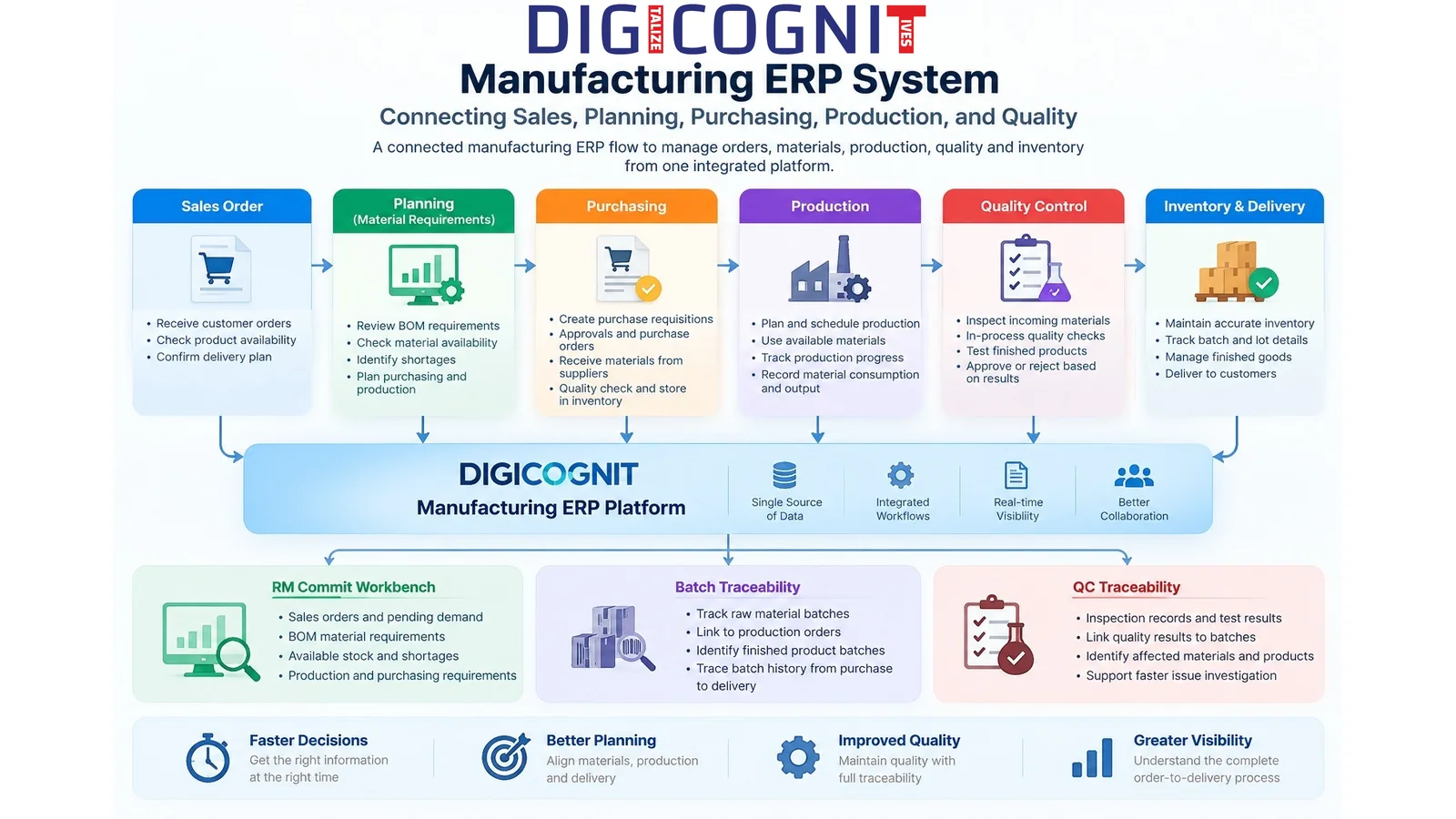
How DIGICOGNIT Supports Manufacturing Operations
DIGICOGNIT provides an enterprise business platform that brings together ERP capabilities, planning, workflow automation, quality management, batch traceability, document management, dashboards, reporting, and system integration.
The platform can be used as an extension to an existing ERP, such as Oracle EBS, or as a standalone ERP or business management platform.
Relevant capabilities include:
RM Commit Workbench
Helps planners review sales demand, BOM requirements, raw materials, stock, production needs, and purchasing requirements in one planning view.
Batch Traceability
Helps track material and batch relationships across purchasing, receipts, production, inventory, and delivery.
QC Traceability
Helps teams review quality inspections, test results, and decisions associated with manufacturing records.
Workflow and Approvals
Supports business processes that require defined steps, approvals, and responsibilities.
Documents, Dashboards and Reports
Helps teams access relevant business information, supporting documents, and operational reports.
These capabilities support different stages of manufacturing, from understanding customer demand to managing materials, production, quality, and delivery.
The right setup depends on the company's existing systems, workflows, and operational requirements.
Conclusion
Manufacturing becomes difficult to coordinate when sales, planning, purchasing, production, quality, and inventory work with separate views of the same order.
A manufacturing ERP system helps connect these activities so teams can understand material requirements, follow purchasing progress, manage production, and track quality and inventory.
The goal is not simply to record what has happened. It is to give teams the information they need to decide what to do next.
For manufacturing businesses looking to improve coordination across departments, connecting sales, planning, purchasing, production, and quality is a practical step towards better day-to-day operations.
DIGICOGNIT supports this approach through its ERP capabilities, RM Commit Workbench, workflow automation, Batch Traceability, QC Traceability, dashboards, and reporting.
Explore how DIGICOGNIT can help connect your manufacturing processes.
Frequently Asked Questions
What is a manufacturing ERP system?
A manufacturing ERP system connects activities such as sales, planning, purchasing, production, quality, and inventory so teams can manage related business processes using connected information.
How does ERP help with manufacturing planning?
It helps connect customer demand with BOM requirements, available materials, purchasing needs, and production requirements. This gives planners a clearer view of what is needed to complete an order.
What is an RM Commit Workbench?
An RM Commit Workbench provides a consolidated view of sales demand, raw-material requirements, stock availability, production needs, and purchasing requirements to support order planning.
What is batch traceability in manufacturing?
Batch Traceability helps track materials and batches from their source through production, inventory, and delivery. It can help businesses investigate material issues and identify potentially affected products.
What is QC Traceability?
QC Traceability connects inspections, test results, and quality decisions with related materials, batches, and manufacturing activities.
What is the difference between Batch Traceability and QC Traceability?
Batch Traceability focuses on where a batch came from and where it went. QC Traceability focuses on quality history, inspection results, and the possible impact of quality issues.
Can a manufacturing ERP system work with an existing ERP?
Yes. Depending on the system and integration requirements, a platform can extend an existing ERP or operate as a standalone business management system. DIGICOGNIT supports both approaches, including use as an extension to Oracle EBS.
Why should purchasing and production be connected?
Production depends on material availability. Connecting purchasing with production planning helps teams understand what needs to be ordered, follow material availability, and identify potential delays.
Explore Connected Manufacturing Operations with DIGICOGNIT
Learn how DIGICOGNIT's ERP, planning, workflow, and traceability capabilities can help your business connect sales, purchasing, production, quality, and inventory.
